Paint Brushes 1: Create Elegant Mockups
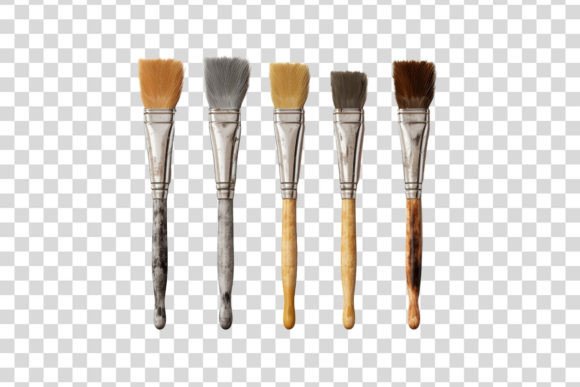
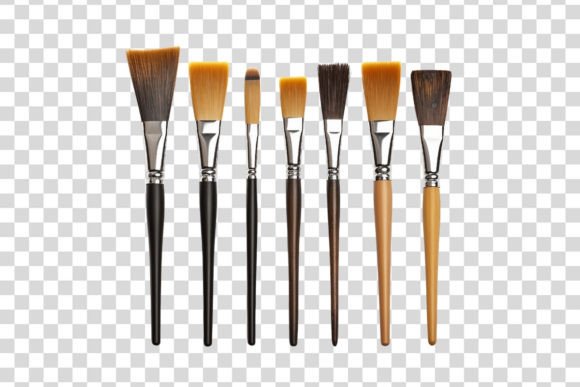
Bringing a static image to life often requires more than just good photography; it demands the right tools to set the stage. With Paint Brushes 1, you gain access to a high-quality isolated object designed specifically for customization. This resource allows creators to build elegant and unique mockups by placing realistic paint brushes into any scene they envision. Whether you are a graphic designer looking to showcase a new product line or an educator preparing visual aids, this single PNG file with a transparent background serves as a versatile foundation for your digital projects.
Understanding the Power of Isolated Objects
At its core, Paint Brushes 1 is a digital asset that simplifies the complex process of product visualization. In the world of design, "isolated objects" refer to images where the subject has been carefully separated from its original background. The result is a clean, crisp image that can be placed over other layers without awkward white borders or distracting edges. This specific download includes one high-resolution PNG file, optimized for immediate use in layer-based software.
The value of such an asset lies in its flexibility. Instead of spending hours photographing physical brushes under perfect lighting conditions, or wrestling with difficult cutouts, you can instantly integrate this professional-grade image into your workflow. It captures the texture, shape, and detail of real paint brushes, ensuring that your final composition looks authentic rather than like a flat sticker pasted onto a canvas. For beginners, this removes a significant technical barrier, while professionals appreciate the time saved on retouching and masking.
Why Customization Matters for Your Scene
One size rarely fits all when it comes to branding and storytelling. A paint brush sitting on a wooden table tells a different story than one floating against a minimalist gradient or resting on a textured canvas. Paint Brushes 1 empowers you to customize your own scene completely. By providing a transparent background, the file invites you to become the director of the visual narrative.
This level of control is essential for creating unique mockups that stand out in crowded markets. Imagine you are a small business owner selling handmade art supplies. You need to show how your brushes look in a creative studio setting. With this asset, you can composite the brush onto a photo of a messy desk, add shadows, adjust the lighting to match the environment, and even change the angle slightly if your software supports it. The ability to adapt the object to various contexts means your marketing materials remain fresh and relevant across different campaigns.
Seamless Integration with Popular Software
A major advantage of this resource is its broad compatibility. The included PNG file works flawlessly with industry-standard applications like Adobe Photoshop and Creative Cloud. These platforms offer advanced tools for blending, shadowing, and color correction, allowing you to make the brush appear as if it were physically present in your scene. However, the utility of Paint Brushes 1 extends far beyond professional suites.
If you prefer open-source solutions, the file is fully compatible with GIMP, offering powerful editing capabilities without a subscription cost. Similarly, users of Paint Shop Pro or any other software that supports layers can import this asset directly. This universality ensures that regardless of your budget or preferred workflow, you have access to high-quality design elements. The transparency of the PNG format is key here; it allows the underlying layers of your project to show through naturally, creating depth and realism that JPEGs simply cannot achieve.
Practical Applications Across Industries
The versatility of Paint Brushes 1 makes it suitable for a wide range of audiences and purposes. For freelancers and bloggers, it provides an instant way to create eye-catching headers or featured images for articles about art techniques, DIY crafts, or interior design. Instead of relying on generic stock photos that others might be using, you can craft a bespoke image that aligns perfectly with your brand identity.
Educators can also benefit significantly. When creating presentations or digital handouts, having a clear, isolated image of a paint brush helps students focus on the tool itself without background distractions. You can place the brush next to text labels, diagrams, or step-by-step instructions to enhance learning. Marketers and entrepreneurs often use these assets to create social media graphics that promote workshops, online courses, or product launches. The ability to quickly generate professional-looking visuals keeps content pipelines moving efficiently.
Consider a scenario where a startup is launching a new line of eco-friendly art supplies. They need to communicate sustainability and quality. Using Paint Brushes 1, they could place the brush on a bed of green leaves or recycled paper textures, reinforcing their brand message visually. This contextual storytelling is much harder to achieve with standard photography but becomes straightforward with a well-designed isolated object.
Key Considerations Before You Start
While Paint Brushes 1 offers immense flexibility, there are a few practical things to keep in mind to ensure the best results. First, consider the resolution of your final output. Since this is a single PNG file, it is important to check that the dimensions are sufficient for your intended use, whether that is a small Instagram post or a large billboard. High-quality downloads usually maintain sharpness at various sizes, but always verify before committing to a print project.
Secondly, think about lighting consistency. Even though the object is high-quality, it was photographed under specific lighting conditions. To make it blend seamlessly into your custom scene, you may need to adjust the brightness, contrast, or color temperature of the brush to match your background. Most layer-based software includes adjustment layers that make this process non-destructive and easy to tweak. Adding subtle drop shadows or reflection effects can further ground the object in your scene, preventing it from looking "floating" or artificial.
Finally, remember that while this asset is a powerful tool, it is part of a larger creative ecosystem. It pairs best with thoughtful composition and a clear vision for your message. Don't feel pressured to use every feature of your software immediately; start by placing the brush in a simple scene and gradually experiment with more advanced blending modes and filters. The goal is to create elegant and unique mockups that serve your specific needs, not to overcomplicate the process.
Building Your Creative Workflow
Incorporating Paint Brushes 1 into your toolkit can streamline your design process significantly. By having a reliable, high-quality asset ready to go, you reduce the friction between idea and execution. This efficiency is particularly valuable for busy professionals who need to turn around projects quickly without sacrificing quality. It allows you to focus on the bigger picture—your brand story, your audience engagement, and your overall design strategy—rather than getting bogged down in the minutiae of image preparation.
As you explore the possibilities of customizing your own scene, you will likely find new ways to utilize this resource. Perhaps you will combine it with other isolated objects to create a full workspace setup, or use it as a recurring motif in your brand's visual language. The transparent nature of the file ensures that it remains adaptable as your needs evolve. Whether you are just starting your creative journey or are a seasoned pro looking for efficient solutions, this download provides a solid foundation for building compelling visual content.