Evaluating the Lexia Procreate Color Palette for Digital Artists
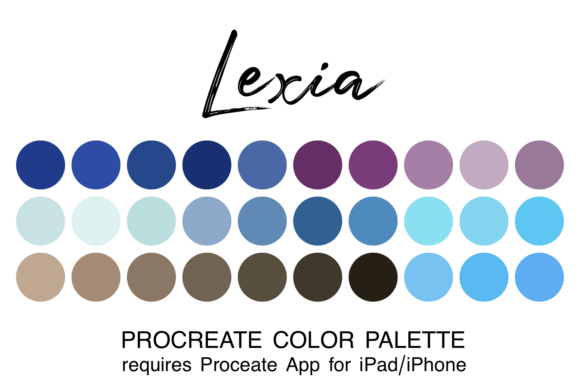
Creating artwork in Procreate is significantly more efficient and enjoyable when you have a coordinated or themed color palette at your disposal. The ability to focus on composition, brushwork, and storytelling without the constant interruption of hunting for the perfect hue can transform the creative workflow. This is where curated resources like the Lexia Procreate Color Palette become valuable assets. Designed specifically for the Procreate app on iPad and iPhone, this resource offers a streamlined collection of 30 colors in a single ".swatch" file, intended to reduce decision fatigue and enhance artistic consistency.
For digital artists ranging from hobbyists to professionals, selecting the right color toolset is a critical decision factor. While many options exist, understanding what makes the Lexia Procreate Color Palette distinct, how it compares to other methods, and when it fits best into your workflow is essential for making an informed choice. This guide explores the practical applications, installation nuances, and strategic value of using pre-curated palettes versus building them from scratch.
Understanding the Lexia Procreate Color Palette Structure
The core utility of the Lexia Procreate Color Palette lies in its curation and format. Unlike random collections of hues found in generic freebie packs, this palette is designed with a specific aesthetic coherence. It contains exactly 30 colors, a number that strikes a balance between variety and manageability. Having too many colors can lead to "choice paralysis," where an artist spends more time scrolling through options than painting. Conversely, too few can limit expressive range. The 30-color constraint forces a level of discipline that often results in more harmonious final pieces.
The file format is a crucial technical detail. The palette is distributed as a ".swatch" file, which is the native format recognized by the Procreate application. This ensures seamless integration without the need for complex conversion tools or third-party plugins. When you download the zipped file to your device's "Downloads" folder within the Files app, unzip it, and tap the filename, the system automatically imports the swatches directly into your Procreate library. This frictionless installation process is a significant advantage for users who want immediate access to their new tools without navigating steep learning curves.
Once installed, accessing the palette is intuitive. By clicking the colored dot in the top right corner of the Procreate interface, users can locate the Lexia palette in their list. A notable feature is the option to set this collection as the default palette. For artists working on a series of illustrations or a book project requiring consistent coloring, setting a thematic palette as the default ensures that every new canvas starts with the correct tonal foundation, maintaining visual continuity across multiple works.
Comparing Curated Palettes vs. Custom Creation
When evaluating whether to use the Lexia Procreate Color Palette or create custom palettes, it is helpful to weigh the tradeoffs between time investment and creative control. Building a palette from scratch allows for infinite customization. An artist can sample colors from photographs, reference images, or physical objects to ensure absolute accuracy to a real-world subject. This approach is ideal for hyper-realistic work or projects requiring strict adherence to a specific brand guideline that cannot be approximated by a pre-made set.
However, the primary drawback of custom creation is the time cost. Selecting, testing, and refining a cohesive set of 30 colors can take hours of experimentation. In contrast, the Lexia Procreate Color Palette provides a "ready-to-paint" solution. The strength here is speed and inspiration. If an artist is stuck on a concept or needs to quickly sketch out ideas, having a pre-selected harmony of tones allows the mind to focus on form and light rather than color theory mechanics. The palette acts as a creative constraint that can actually spark innovation by limiting the variables.
Another comparison point is the learning curve for beginners. New users of Procreate often struggle with color mixing and selection. Using a curated resource like the Lexia palette removes the anxiety of choosing "wrong" colors. It serves as an educational tool, demonstrating how different shades, tints, and complementary colors interact within a unified scheme. Over time, studying these arrangements can help novice artists develop their own eye for color harmony, eventually enabling them to build their own effective palettes.
Strategic Use Cases and Limitations
The Lexia Procreate Color Palette is not a one-size-fits-all solution, and recognizing its limitations is part of making a smart purchasing or downloading decision. Its greatest strength is in stylized illustration, concept art, and character design where mood and atmosphere are paramount. For instance, if an artist is creating a fantasy landscape or a whimsical children's book illustration, the thematic nature of the palette can instantly establish the desired tone—whether it is warm and inviting or cool and mysterious.
However, there are situations where this resource may not be the right choice. If your project requires a photorealistic rendering of a specific environment, such as a portrait of a person with unique skin tones or a product shot with precise corporate branding, a pre-set palette might lack the necessary nuance. In these cases, relying solely on the 30 provided colors could result in a flat or inaccurate representation. The limitation here is flexibility; while the palette is excellent for stylistic work, it is less suitable for tasks demanding exact color matching to external references.
Furthermore, the fixed nature of the 30 colors means that if a specific shade is missing, you must manually add it or switch palettes. Some advanced workflows involve dynamic color grading where hundreds of subtle variations are needed. For these high-end professional scenarios, the Lexia palette might serve better as a base layer or a starting point rather than the exclusive source of color. Artists should view it as a component of a larger toolkit rather than a replacement for all color management strategies.
Installation and Workflow Integration
Technical compatibility is a prerequisite for any digital asset. It is important to note that the Lexia Procreate Color Palette requires the Procreate app to be installed on an iPad or iPhone. Users attempting to use these files on desktop software like Photoshop or Clip Studio Paint will find them incompatible without conversion. This hardware specificity narrows the audience but ensures a highly optimized experience for those within the Apple ecosystem.
The installation process is straightforward but requires attention to detail. After downloading the zipped file, users must navigate to the Files app on their iPad, locate the download, and unzip the archive. Clicking the resulting ".swatch" file triggers the iOS share sheet or direct import function, adding the palette to Procreate immediately. Once inside the app, finding the palette involves tapping the color wheel icon (the colored dot) in the top right corner. From there, users can browse their library to select the new Lexia palette.
To maximize efficiency, experienced users often duplicate the palette upon first import. This creates a backup version that can be modified without altering the original set. Additionally, setting the palette as the default ensures that every new canvas opens with these colors ready, streamlining the start of each session. This small configuration step transforms the palette from a passive asset into an active part of the daily workflow, reducing the friction between idea and execution.
Making an Informed Decision
Deciding whether to integrate the Lexia Procreate Color Palette into your toolkit depends largely on your current workflow bottlenecks and artistic goals. If you frequently find yourself spending excessive time searching for colors, struggling with color harmony, or feeling overwhelmed by the blank canvas, this resource offers a practical solution. It provides a structured environment that encourages creativity by removing the burden of initial color selection.
On the other hand, if your work demands extreme precision, frequent changes in color schemes, or realistic replication of specific scenes, you may find the fixed nature of the 30 colors restrictive. In such cases, the palette might still be useful as a reference or a starting block, but it should not be relied upon exclusively. The most effective approach often involves a hybrid strategy: using curated palettes like Lexia for brainstorming and stylized work, while reserving custom color picking for detailed, realistic finishing touches.
Ultimately, the value of the Lexia Procreate Color Palette lies in its ability to simplify the creative process. By offering a cohesive set of 30 colors in a user-friendly format, it empowers artists to focus on what matters most: the art itself. Whether you are a beginner looking to learn color theory or a seasoned professional seeking to speed up your workflow, understanding the strengths and boundaries of this tool allows you to leverage it effectively within your broader creative practice.