Camo Procreate Color Palette: Elevate Your Digital Artwork with Military-Inspired Tones
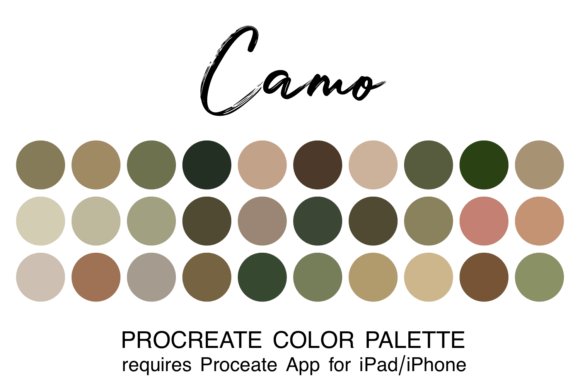
Creating artwork in Procreate is easier and more fun when you have a coordinated or themed color palette. Instead of spending valuable creative energy hunting for the perfect shade of olive green or muted sand, you can focus entirely on the art creation process without the hassle of trying to find colors. This is exactly why adding curated palettes to your Procreate assets is such a game-changer for digital artists. The Camo Procreate Color Palette offers a sophisticated collection of earth tones, military greens, and tactical neutrals designed to streamline your workflow while delivering professional results.
What Is the Camo Procreate Color Palette?
The Camo Procreate Color Palette is a specialized digital asset containing 30 carefully selected colors in one file of the ".swatch" type specifically for use in the Procreate app. Unlike random collections of hues, this palette is built around the aesthetic of camouflage patterns found in nature and military gear. It includes deep forest greens, dusty browns, slate greys, and soft beiges that work harmoniously together. These aren't just flat colors; they are calibrated to interact well with Procreate's blending modes, opacity settings, and brush engines.
For beginners and seasoned pros alike, having a pre-made set of colors removes the friction from the start of a project. You don't need to be a color theorist to create stunning compositions when your foundation is already laid out with a cohesive scheme. Whether you are sketching a character design, painting a landscape, or creating marketing materials, this palette provides a ready-to-use toolkit that saves time and ensures visual consistency.
Installation Made Simple for iPad and iPhone Users
Before diving into your next masterpiece, it is essential to get the palette installed correctly. A quick way to install the swatch is firstly to download the zipped file to your iPad "Downloads" folder in your Files app. Once the download is complete, unzip the file and click directly on the swatch filename. If you have the Procreate app installed on your iPad or iPhone, the system will automatically recognize the file format and add it to your library.
Note for beginners: You must have the Procreate app installed on your device to use this color swatch file. Without the app, the file cannot be imported. When you next open Procreate, you can find the palette by clicking on the colored dot in the top right corner of your screen and then finding it in your list of palettes. You also have the option to set it as your default palette, ensuring that every new canvas you start begins with these tactical tones ready at your fingertips.
Real-World Applications for Creators and Professionals
The versatility of the Camo Procreate Color Palette extends far beyond simple doodles. It serves as a robust tool for various professionals and hobbyists who need reliable, thematic colors. Here is how different users apply these tones in their daily workflows.
Character Design and Illustration
Illustrators working on sci-fi concepts, military fiction, or outdoor adventure stories often struggle to find greens that don't look too neon or too muddy. This palette solves that problem immediately. For example, a concept artist designing a soldier's uniform or a ranger's gear can pull directly from the swatches to ensure the fabric textures look realistic under different lighting conditions. The muted tones allow for better depth when layering shadows and highlights, making characters pop off the screen with a grounded, believable presence.
Marketing and Branding Assets
Entrepreneurs and marketers in the outdoor, survival, or tactical niche benefit significantly from this resource. Imagine a small business owner selling hiking gear or camping equipment. They need social media graphics that convey durability and nature without looking generic. By using the Camo Procreate Color Palette, they can create Instagram posts, blog headers, and product mockups that instantly resonate with their target audience. The colors evoke a sense of ruggedness and reliability, which are key emotional triggers for consumers in these markets.
Educational and Storytelling Projects
Teachers and content creators producing educational materials about nature, biology, or history can leverage these colors to make their visuals more engaging. An educator creating a diagram about forest ecosystems or a blogger writing about wildlife conservation can use the palette to highlight specific elements without clashing with the background. The natural harmony of the colors helps keep the viewer's focus on the information rather than being distracted by jarring hues.
Why Curated Palettes Matter for Your Workflow
The primary advantage of using a dedicated swatch file like the Camo Procreate Color Palette is efficiency. In the fast-paced world of digital content creation, time is a luxury few can afford. Every minute spent adjusting hue sliders or mixing custom shades is a minute taken away from actual drawing. By having 30 colors pre-loaded, you eliminate decision fatigue. You know that any color you pick from this list will work with the others, allowing you to experiment freely with composition and texture.
Furthermore, consistency is crucial for branding and series work. If you are creating a comic strip or a series of tutorial videos, maintaining a consistent color story is vital. Switching between random colors can make a project feel disjointed. With a curated palette, every piece you produce shares a DNA, creating a recognizable style that audiences come to trust and enjoy.
Considerations Before You Download
While the Camo Procreate Color Palette is a powerful tool, it is important to consider your specific needs before applying it to your projects. First, ensure that the aesthetic aligns with your vision. If you are working on a pastel dream sequence or a high-energy cyberpunk scene, these earthy, tactical tones might not be the best fit. However, for anything related to nature, outdoors, military themes, or neutral backgrounds, this palette is an ideal choice.
Additionally, remember that a palette is a starting point, not a restriction. While the 30 colors provided are versatile, do not feel pressured to use only them. Use them as a base and mix in other shades if your project demands it. The goal is to accelerate your process, not limit your creativity. Also, verify that your device meets the requirements; as mentioned, you need the Procreate app on an iPad or iPhone to utilize the .swatch file effectively.
Maximizing Your Creative Potential
Incorporating the Camo Procreate Color Palette into your digital toolkit is a strategic move for anyone serious about their craft. It bridges the gap between technical setup and artistic expression, allowing you to dive straight into the joy of creation. Whether you are a freelancer rushing to meet a deadline, a hobbyist exploring new styles, or a business owner building a brand identity, having the right colors at your disposal makes all the difference.
By downloading this file, unzipping it, and setting it as your default, you are investing in a smoother, more enjoyable creative journey. The result is artwork that feels intentional, cohesive, and professionally executed, all because you started with the right foundation. Embrace the power of curated colors and let your imagination take the lead.