Ink Splashes Photoshop Brushes: 21 Dynamic Tools
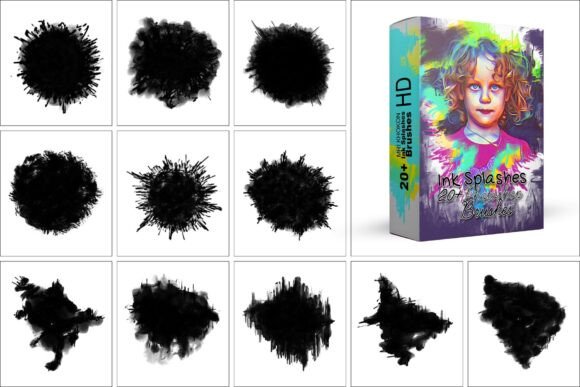
Digital art often struggles to capture the unpredictable energy of physical media. A single drop of ink hitting paper creates a chaotic, organic reaction that is difficult to replicate with standard geometric shapes or smooth gradients. This is where specialized tools like Ink Splashes Photoshop Brushes become essential. By digitizing the physics of fluid dynamics, these brushes allow creators to inject raw texture and spontaneous movement into their work instantly. The collection featuring 21 unique brushes offers a bridge between the control of digital software and the messy beauty of traditional ink.
The Value of Organic Texture in Digital Design
For anyone working within Adobe Photoshop, the difference between a flat vector shape and a textured ink blot can define the mood of an entire project. These brushes are not merely decorative; they serve as foundational elements for creating depth, contrast, and visual interest. Whether you are designing a grunge poster, illustrating a storybook, or creating a background for a website, the ability to simulate realistic ink drops, spray marks, and watercolor textures adds a layer of authenticity that clean lines cannot achieve.
The versatility of this specific bundle lies in its range. It includes everything from dirty, messy splashes that look like accidental spills to more controlled, defined ink marks suitable for precise detailing. This variety ensures that the tool adapts to your workflow rather than forcing your workflow to adapt to the tool. With full customization options for size, opacity, and flow, the Ink Splashes Photoshop Brushes integrate seamlessly into existing projects, allowing for immediate experimentation without a steep learning curve.
How Beginners Can Leverage Instant Creativity
For those new to digital illustration, the barrier to entry can sometimes be the complexity of creating complex textures from scratch. Learning to blend modes, layer masks, and manual painting techniques takes time. However, high-quality brush packs provide a shortcut to professional-looking results. A beginner using these brushes can focus on composition and color theory while relying on the preset shapes to handle the intricate details of the ink spread.
Consider a student designer tasked with creating a logo for a local coffee shop. Instead of spending hours trying to paint a perfect drip effect manually, they can select a brush from the "dirty splash" category, apply it once, and adjust the opacity to match the brand's aesthetic. This efficiency boosts confidence and allows novices to produce portfolio-ready work much faster. The ease of use is a critical factor here; if a tool requires extensive configuration before it yields results, it may discourage a learner. These brushes are designed to work immediately upon installation, making them an excellent educational resource for understanding how texture influences design perception.
Professional Efficiency and Workflow Integration
Experienced designers and professionals have different priorities. For them, time is a finite resource, and reliability is paramount. They do not need a brush that looks good by accident; they need one that behaves consistently across hundreds of iterations. The compatibility of these brushes with Photoshop versions ranging from CC2015.5 through CC2021 and beyond ensures that they fit into established pipelines without causing technical friction.
A marketing agency might use these assets to create social media graphics that stand out in a crowded feed. The "grungy" aesthetic is particularly effective for music festivals, streetwear brands, or edgy editorial content. Professionals value the flexibility to tweak the flow and spacing settings to ensure the ink patterns do not repeat too obviously. Furthermore, the inclusion of 50 files (as noted in the product specifications) suggests a comprehensive library that covers various scales, from fine mist sprays to large, dramatic splatters. This breadth reduces the need to source additional assets, streamlining the production process and ensuring visual consistency across a campaign.
Educators and Content Creators
Teachers and online educators often seek resources that demonstrate concepts clearly. When teaching about texture, contrast, or mixed media, having a set of reliable digital tools allows for clear demonstrations. An educator can show students how a simple black circle transforms into a dynamic element when overlaid with an ink splash, illustrating the power of layering and blending modes.
Similarly, bloggers and content creators who produce tutorials or visual guides benefit from the high-definition quality of these brushes. Their audiences expect crisp, professional visuals. Using generic or low-resolution assets can undermine the credibility of the content. By utilizing the Ink Splashes Photoshop Brushes, creators ensure that their examples are polished and inspiring, encouraging their audience to experiment with similar techniques. The commercial viability of the resulting designs also matters here; creators know that high-quality assets lead to better engagement and potential monetization opportunities.
Small Business Owners and Entrepreneurs
For small business owners who manage their own branding, the ability to create custom visuals without hiring an external designer is a significant advantage. Many entrepreneurs start with limited budgets but high ambitions. They need tools that offer high perceived value at a low cost. These brushes provide exactly that: the look of expensive, hand-painted artwork generated quickly and affordably.
Imagine a boutique owner designing flyers for a summer sale. A clean, corporate font might feel too stiff for the brand identity. Adding an ink splash background instantly communicates creativity and approachability. The decision-making process for this audience revolves around cost-benefit analysis. Does this asset solve my problem? Yes. Is it easy to implement? Yes. Will it make my product look more premium? Yes. The long-term usefulness of such a pack is high because the fundamental need for texture and artistic flair does not change with trends.
Evaluating Quality and Compatibility
When considering any digital asset, technical specifications matter. The Ink Splashes Photoshop Brushes are built to function reliably across a wide spectrum of software versions. From the older CC2015.5 to the latest updates, the file structure remains intact, ensuring that users do not face compatibility issues that could halt a project. This reliability is crucial for freelancers who may be working on client machines with varying software configurations.
Beyond version compatibility, the quality of the brush tips themselves is the deciding factor. Low-quality brushes often appear pixelated or lack the subtle variations found in real ink. This collection addresses that by offering distinct styles that mimic the natural irregularities of liquid. The ability to customize parameters like scattering, jitter, and texture allows the user to tailor the output to specific needs, whether that is a subtle watermark or a dominant focal point.
Finding the Right Fit for Your Project
Ultimately, the decision to use these brushes depends on the specific goals of your project. If your work relies heavily on minimalism and clean geometry, these tools may not be necessary. However, if you are aiming for abstract designs, decorative elements, or a touch of realism, they are indispensable. They serve as a catalyst for creativity, removing the technical hurdles of texture creation so you can focus on the bigger picture.
Whether you are a hobbyist exploring digital painting for the first time or a seasoned pro looking to speed up your rendering process, the Ink Splashes Photoshop Brushes offer a practical solution. They democratize access to high-end artistic effects, proving that powerful tools do not have to be complicated. By integrating these 21 unique brushes into your toolkit, you unlock a new dimension of expression, ready to transform your digital canvas into something vibrant, textured, and uniquely yours.