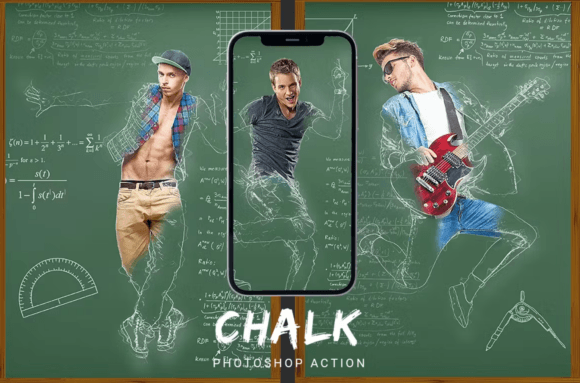
Transforming Digital Imagery with the Chalk Photoshop Action
In the realm of digital artistry, the ability to mimic traditional media has always been a sought-after skill. Artists and designers often strive to capture the texture, imperfection, and nostalgic charm of hand-drawn sketches within a pixel-perfect environment. The Chalk Photoshop Action emerges as a powerful tool in this landscape, offering a streamlined pathway to convert standard photographs into convincing chalkboard illustrations. This technology bridges the gap between photography and fine art, allowing users to infuse their work with a tactile quality that feels both organic and meticulously crafted.
The Art of Simulating Traditional Media Digitally
Digital software is inherently precise, often resulting in images that feel too clean or sterile for certain creative visions. To achieve an authentic look, artists must introduce elements of randomness, texture, and depth. A well-designed action automates this complex process. When you apply a Chalk Photoshop Action, the software does not merely change the color palette; it reconstructs the image data to simulate the way chalk interacts with a rough surface. It breaks down solid colors into granular textures, softens edges to mimic smudging, and introduces shadows that suggest the three-dimensional nature of chalk dust on a board.
This transformation is particularly effective because it leverages the underlying logic of how light and shadow interact with textured surfaces. Unlike simple filters that might flatten an image, advanced actions utilize layer masks, blending modes, and adjustment layers to preserve the luminosity of the original photo while overlaying the characteristic grain of chalk. The result is an image that retains the recognizability of the subject—whether it is a portrait, a landscape, or an architectural detail—but presents it through the lens of a classic medium.
Understanding the Technical Foundation
To appreciate the versatility of this tool, one must understand the technical requirements that ensure its functionality. The action is built upon specific parameters to guarantee compatibility across different systems. It is designed to operate exclusively in RGB Mode with an 8 Bits per channel color depth. These settings are critical because they provide the necessary color range and tonal resolution required for the intricate layer adjustments the action performs. Attempting to run the file in CMYK or 16-bit mode can lead to unexpected results or errors, as the mathematical calculations for the brushes and patterns are calibrated for standard web and screen display formats.
Furthermore, the architecture of the action relies on a robust set of resources. It includes a custom ATN file containing the sequence of steps, a specialized ABR brush set to generate the chalk strokes, and a unique PAT pattern file to replicate the background texture. These components work in unison. When the user initiates the process, the script loads these assets and applies them sequentially. The inclusion of a detailed Instruction for the user.txt file ensures that even those unfamiliar with complex scripting can navigate the installation process smoothly. Additionally, the presence of a video instruction tutorial provides visual guidance, making the learning curve nearly non-existent for beginners.
Workflow Integration for Professionals and Hobbyists
The true value of the Chalk Photoshop Action lies in its efficiency and ease of integration into existing workflows. For professional graphic designers, time is a premium resource. Manually recreating a chalk effect involves creating multiple layers, masking areas, applying noise, adjusting levels, and painting over sections with custom brushes—a process that could take hours. With this automated solution, the entire transformation happens at the press of a button. This speed allows professionals to experiment with concepts rapidly, presenting clients with diverse stylistic options without compromising their schedule.
For hobbyists and educators, the barrier to entry is significantly lowered. The action is engineered to be beginner-friendly, removing the need for deep knowledge of Photoshop's interface. A teacher preparing materials for a classroom, for instance, can quickly turn a photograph of a historical figure into a chalk-style illustration suitable for a blackboard presentation. Similarly, a parent looking to create a unique birthday card can transform a family photo into a whimsical drawing effortlessly. The "start button" approach democratizes high-level artistic effects, placing capabilities once reserved for experts into the hands of anyone with a copy of Adobe Photoshop.
Customization and Layer Management
A common misconception about automated actions is that they produce rigid, unchangeable results. However, this particular tool is built with flexibility in mind. The action generates a project file with well-organized layers and folders. Each step of the transformation is contained within its own layer or group, labeled clearly for easy identification. This structure is vital for post-processing. If a user finds the chalk effect too heavy on the eyes, they can simply lower the opacity of the specific texture layer. If the background needs to be darker to make the white chalk pop, the adjustment layers remain editable.
This adjustability empowers the user to refine the output to suit their specific aesthetic needs. One might wish to enhance the contrast in the highlights or soften the edges further to create a more ethereal look. Because the layers are not flattened, the user retains full control over the composition. This feature is especially useful for business owners who need to maintain brand consistency. They can tweak the saturation or hue of the chalk effect to align with their company colors while maintaining the core texture of the style.
Applications Across Diverse Subject Matter
One of the most compelling aspects of the Chalk Photoshop Action is its universality. The algorithm is robust enough to handle a wide variety of subjects without losing fidelity. Whether the input image features people, animals, buildings, or abstract objects, the action adapts its processing to highlight the defining characteristics of the subject.
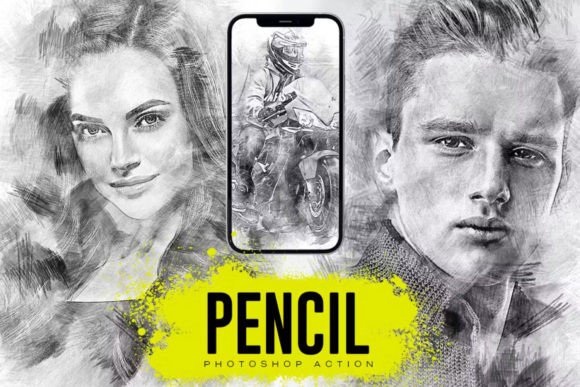
- Portraits: Human faces benefit immensely from the softening effect of the chalk simulation. It smooths skin tones naturally while preserving facial expressions, creating a timeless, sketch-like quality that is popular in wedding photography and editorial design.
- Animals: Fur and feathers are rendered with a textured stroke that mimics the direction of hair growth. The action captures the essence of the animal's form without getting bogged down in hyper-realistic detail, resulting in charming and expressive illustrations.
- Architecture and Landscapes: Buildings and cityscapes gain a sense of nostalgia when converted to chalk style. The linear perspective of structures is maintained, while the sky and natural elements acquire a dreamy, hand-drawn atmosphere. This is ideal for travel blogs, real estate marketing, and urban planning presentations.
- Objects and Products: For product photography, the chalk effect can add a playful or artisanal touch. It is frequently used in packaging design or social media campaigns to make commercial items appear more handmade and approachable.
The versatility extends to the type of source material as well. High-resolution studio shots work beautifully, but the action also handles casual snapshots taken with smartphones surprisingly well. By adding the texture of the chalkboard, minor imperfections in the original photo are often masked, turning a mediocre image into a stylized piece of art.
Version Compatibility and System Requirements
Ensuring that the software runs correctly is paramount for a seamless experience. The Chalk Photoshop Action is optimized for modern versions of Adobe Photoshop, specifically supporting CS6 and all subsequent CC (Creative Cloud) releases. This wide compatibility range means that users with slightly older hardware or those who prefer perpetual licenses over subscriptions can still access the tool. It is important to note, however, that the action requires the English version of Photoshop. The scripting language and layer naming conventions are hardcoded in English, so running the action on localized versions of the software may cause it to fail or behave unpredictably.
Users should also be aware that the preview images often seen in promotional materials are for demonstration purposes only and are not included in the download package. The package contains the functional files: the ATN action, the ABR brushes, the PAT patterns, and the instructional text and video guides. Once installed, the user can import any personal photograph to begin the transformation.
Strategic Considerations for Content Creators
In the current digital ecosystem, standing out requires a unique visual identity. Social media platforms like Instagram, Pinterest, and TikTok are saturated with high-definition, polished imagery. Introducing a hand-crafted aesthetic like the chalk style can break through the noise and engage audiences on an emotional level. The perceived effort and artistry associated with chalk drawings often resonate more deeply with viewers than standard photos, fostering a stronger connection between the creator and the audience.
For businesses, this style can be a strategic asset. It conveys values such as creativity, tradition, and authenticity. A coffee shop using chalk-style photos of their baristas on their menu creates a cozy, inviting atmosphere. An educational institution using similar imagery for student portraits projects a sense of history and academic rigor. The Chalk Photoshop Action serves as a cost-effective method to achieve this branding consistency without hiring a team of illustrators.
Moreover, the educational aspect of this tool cannot be overstated. For students learning digital art, studying the layer structure of the action provides insight into how professional effects are constructed. By observing how the brushes, patterns, and adjustment layers interact, learners can reverse-engineer the process to develop their own custom actions. This makes the tool not just a utility for production, but also a valuable resource for education and skill development.
Final Thoughts on Implementation
The transition from a raw photograph to a stylized chalk illustration represents more than just a visual change; it is a shift in narrative. The Chalk Photoshop Action facilitates this shift with remarkable ease and precision. By combining technical robustness with user-friendly design, it empowers a broad spectrum of users—from seasoned professionals to curious beginners—to explore new creative horizons. As digital tools continue to evolve, the ability to seamlessly blend photography with traditional art styles will remain a cornerstone of effective visual communication. Whether for personal expression, educational purposes, or commercial branding, this action offers a reliable and versatile solution for bringing the timeless charm of chalk to the digital age.